
7 Signs Your Business Needs AI Task Automation
Is your business losing time and money due to inefficiencies? If repetitive tasks, frequent errors, or resource bottlenecks are holding you back, AI task automation could be the solution. Companies using AI report faster processing times, fewer mistakes, and lower costs - all while improving team productivity.
Here’s a quick rundown of the 7 signs your business might need AI automation:
- Repetitive tasks: Employees spend over 60% of their time on routine work, reducing focus on high-value activities.
- Frequent errors: Manual processes have higher error rates, costing $50–$150 per mistake.
- Workflow bottlenecks: Delays in approvals or data access waste hours daily.
- Growth challenges: Scaling often increases costs unless processes are automated.
- Lack of real-time visibility: Fragmented data slows decision-making and creates blind spots.
- High costs: Inefficiencies drain 20–30% of annual revenue.
- Employee burnout: Mundane tasks frustrate staff, leading to turnover.
If any of these sound familiar, it’s time to rethink your processes. AI can handle repetitive work, improve accuracy, and free up your team for more impactful tasks. The longer you wait, the harder it will be to keep up with competitors already using automation.
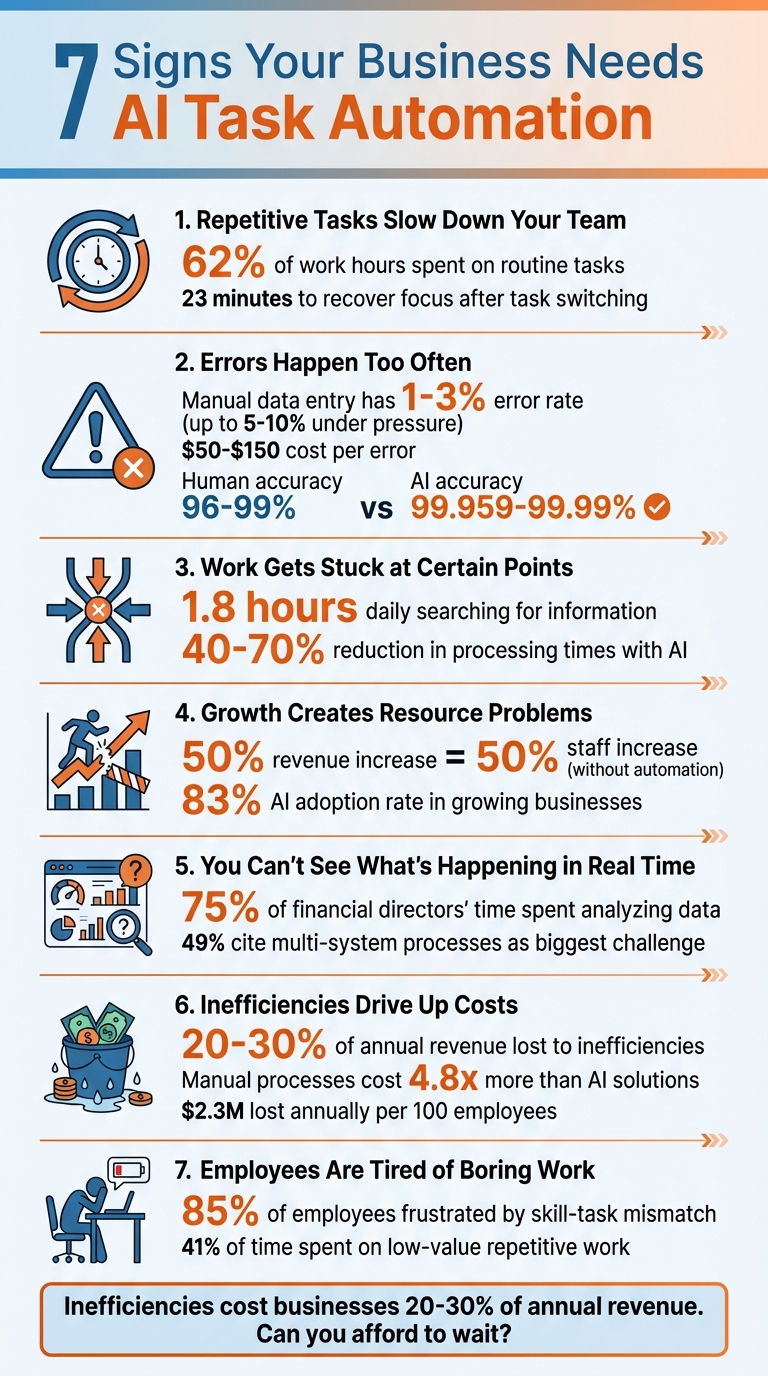
7 Signs Your Business Needs AI Task Automation
3-Step Process to Turn Any Business Task into an AI Automation
sbb-itb-8bb7924
1. Repetitive Tasks Slow Down Your Team
Repetitive tasks are a major drain on productivity. In fact, these tasks consume a staggering 62% of employees' work hours [10], leaving less time for strategic work that actually drives revenue. Think about tasks like data entry, invoice processing, scheduling meetings, or generating reports - they follow the same routine every single time. It’s a clear sign that your business could benefit from AI task automation.
But the cost isn’t just in lost hours. Constantly switching between creative projects and mundane tasks disrupts focus, cutting it by 20%, and it takes an average of 23 minutes to fully recover [3]. This back-and-forth creates a cycle of inefficiency that builds up over the day. So, not only do these repetitive tasks eat away at time, but they also chip away at your team’s overall effectiveness.
Here’s a quick way to identify tasks ripe for automation: if you can teach someone to do it with a simple checklist in under an hour, it’s a good candidate for AI [3]. Look for tasks that occur regularly, follow clear rules, and take more than 30 minutes to complete. Administrative, financial, and operational duties often fit the bill [8][2].
The benefits of automating these tasks are hard to ignore. Companies using AI agents see productivity gains of 25% to 40% [9]. For software engineering teams, AI coding tools help complete tasks 55% faster with 19% fewer errors [9]. On an individual level, AI-powered search and summarization tools can save users over 90 minutes each week [1]. That’s time better spent on innovation, building customer relationships, or focusing on revenue-generating activities.
AI agents are incredibly versatile. They can interpret natural language commands like “Help me with payroll,” understand context from emails and images, and adapt to small changes in interfaces [9]. Spotting these inefficiencies is the first step toward reclaiming valuable time and boosting your team’s productivity.
2. Errors Happen Too Often
Mistakes in everyday tasks can be surprisingly costly. Manual data entry, for instance, has an error rate of 1%–3% under ideal conditions. But in high-pressure fields like healthcare or finance, that number can jump to 5%–10% [4][5]. Each mistake? It could set a company back anywhere from $50 to $150 to fix. When these errors pile up, they don’t just drain resources - they disrupt operations and chip away at customer trust.
Think about it: a single mistyped number in a spreadsheet could mean shipping the wrong product, billing errors, or flawed financial forecasts. These small slip-ups can snowball into larger problems, from customer dissatisfaction to revenue loss. In fact, human errors and inefficiencies can cost businesses 20%–30% of their annual revenue [5].
Fatigue also plays a big role. After just two hours of nonstop work, error rates spike as cognitive fatigue sets in [5]. This isn’t about carelessness - it’s the nature of manual tasks. People confuse similar-looking characters (like "0" and "O"), duplicate entries, or misplace documents. These are issues humans are prone to, especially when under pressure.
AI offers a way out of this cycle. Automated systems boast accuracy rates between 99.959% and 99.99%, compared to human accuracy of 96%–99% [5]. To put it in perspective, where humans might make 100 to 400 errors in 10,000 transactions, AI systems typically make just 1 to 4 mistakes [5]. When it comes to digitizing documents, AI can achieve 99.9% accuracy [4]. And unlike humans, AI doesn’t tire or get distracted - it delivers consistent results around the clock [4][5].
What’s more, AI systems go beyond basic automation. While traditional rule-based systems might stumble when data formats change, AI can interpret intent and adapt to small variations [3]. By enforcing standardization and applying validation rules, AI catches potential issues early, reducing the need for corrections, cutting costs, and ensuring your data is reliable for critical business decisions.
3. Work Gets Stuck at Certain Points
Every business runs into bottlenecks that slow things down. Think about an invoice waiting for approval or a sales lead stuck in the qualification stage - these delays don’t just waste time, they also drain resources and create ripple effects throughout the workflow.
Did you know that the average knowledge worker spends 1.8 hours every day - about 9 hours a week - just searching for information already available in their company’s systems? [3]. Add to that the fact that these workers lose nearly one-third of their productive time to administrative tasks, and it’s easy to see how these bottlenecks pile up [13]. They show up everywhere, from approval delays to clunky tools that don’t communicate well, and even manual handoffs that trap information in silos.
Here’s a real-world example: In September 2025, TechFlow Solutions’ support team was spending 8 hours a day answering repetitive API-related questions. When they introduced an AI agent to handle 85% of these inquiries, their average response time dropped from 4 hours to just 30 seconds. On top of that, they cut costs by 50% [7].
AI automation is a game-changer for tackling these workflow blockages. It can automatically route requests, pull together data for a full picture, and seamlessly transfer information across systems. The impact? Processing times can drop by 40% to 70%, all while maintaining an accuracy rate of 85% to 95% [3].
"Workflow automation is not about replacing people; it's about eliminating workflow inefficiencies, removing operational delays, and giving your team a system where work moves forward without constant follow-ups." - Juntrax [12]
4. Growth Creates Resource Problems
Success often brings unexpected challenges. As your business grows, manual processes can’t keep up with increased revenue. Many companies hit a wall because the administrative workload for each new client grows faster than they can handle. For example, a 50% increase in revenue often requires a 50% increase in staff. This means costs rise alongside income, leaving profit margins stagnant - or worse, shrinking [15][6]. These inefficiencies become even more noticeable as businesses scale, as shown in the examples below.
"Most small businesses do not hit a growth ceiling because they lack clients. They hit it because the admin overhead of serving each additional client grows almost linearly with the client count - and automation breaks that relationship." - AI Journal [15]
AI changes this dynamic. Take Ynvolve, for instance: in July 2025, they automated their quote generation process, cutting the time required by 90%. This allowed them to achieve 50% revenue growth without hiring additional staff, saving $30,000 every month [5]. Another example is HealthCare Partners, which faced a doubling of patient inquiries during a rapid expansion in September 2025. By implementing AI-driven appointment scheduling and triage, they increased capacity by 200% while maintaining a 95% patient satisfaction rate [7].
Here’s the game-changer: AI automation eliminates the traditional link between growth and added costs. Once an automated system is in place, it can handle significantly more volume - processing 200 documents instead of 20 - at zero extra cost [15]. This creates burst capacity, something human teams can’t match. Whether it’s a sudden influx of orders or onboarding a major new client, AI can respond immediately, without the delays of hiring and training new staff [5]. It’s no surprise that growing businesses are embracing this technology, with an 83% AI adoption rate, compared to just 60% among businesses in decline [3].
5. You Can't See What's Happening in Real Time
Without real-time visibility, managing operations effectively becomes a significant challenge. Fragmented data forces team members to piece together scattered information, which slows down decision-making and creates unnecessary delays [3]. This issue becomes even more pronounced when critical data is isolated across tools like CRM systems, email platforms, and collaboration software. For instance, every time a manager needs to check the status of a project or figure out why a deal has stalled, they’re left scrambling to gather bits and pieces of information from various sources.
The problem goes beyond just wasting time. A staggering 75% of financial directors' time is spent analyzing and interpreting data rather than focusing on strategic decisions [16]. On top of that, high-value leads often slip through the cracks because team members assume someone else is handling them [7]. Projects also grind to a halt when no one has a full understanding of what's happening due to fragmented handoffs [3]. In fact, nearly half (49%) of organizations cite processes that span multiple systems as their greatest automation challenge [3].
This is where a unified system can make all the difference. AI offers a solution by providing instant visibility into operations. Take Broadcom, for example: they integrated multiple knowledge bases into an AI-powered support system, which now resolves 88% of IT issues in under one minute [2]. Similarly, Amadeus, a company with over 16,000 employees, implemented an AI-driven entry point for employee support across platforms like ServiceNow and Workday. The result? A 30% to 40% drop in support calls, saving more than 16,000 hours every month [2].
"If you look at the operational landscapes of many organizations today, you will find a mixed bag of processes, applications, and workarounds. When processes work in one fashion on server A and another on server B… operations become more costly and inefficient."
– Deloitte [16]
This quote underscores the importance of integrated, AI-driven dashboards for modern businesses. Instead of manually pulling together metrics, AI systems automate the process, keeping dashboards updated in real time and sending alerts for anomalies [1][17]. Managers can monitor task progress, performance metrics, and bottlenecks as they happen, rather than waiting hours - or even days - for reports. This shift from reactive to proactive management can save individual users over 90 minutes each week [1]. Real-time visibility, powered by AI, transforms how businesses handle operations, streamlining processes and improving efficiency across the board.
6. Inefficiencies Drive Up Costs
Relying on manual processes doesn’t just slow things down - it quietly drains your budget. Research reveals that process inefficiencies can cost companies between 20% and 30% of their yearly revenue [14]. That’s not just a minor issue; it’s a massive loss that often goes unnoticed. And these rising costs only make the workflow bottlenecks mentioned earlier even worse.
The financial impact is staggering. Manual processes cost 4.8 times more than AI-driven solutions due to higher labor expenses, error corrections, and missed opportunities [18]. On average, businesses lose $2.3 million annually in hidden productivity costs for every 100 employees [18]. Knowledge workers spend nearly 20% of their time - basically one full day every week - just searching for data [14]. And manual data entry alone costs U.S. companies an average of $28,500 per employee each year [5].
"We thought our manual processes were efficient until we measured them against AI alternatives. The hidden costs were staggering - 67% of our productivity costs were invisible to traditional accounting."
- Dr. Sarah Martinez, CFO, ProcessOptimization Corp [18]
Real-world examples highlight the benefits of automation. Take Koninklijke Dekker, a 140-year-old lumber company. In 2026, they automated their order processing using AI, eliminating manual data entry entirely. This change allowed their sales team to focus on building customer relationships, saving the company around $2.7 million annually [5]. Stories like this show how AI doesn’t just cut costs - it also improves operational efficiency.
AI automation reduces errors and creates smoother workflows, leading to even greater savings. Manual processes typically have error rates between 1% and 4%, with each mistake costing $50 to $150 to fix [18]. Automated systems, on the other hand, can achieve up to 99.9% accuracy, far surpassing the 96% to 99% accuracy of manual data entry [5]. By eliminating cross-system friction, AI automation can slash operational costs by 30% to 50% [3]. On top of that, businesses report an average ROI of 3.5x within just 18 months [19].
7. Employees Are Tired of Boring Work
Inefficiencies don’t just hit productivity and budgets - they take a toll on your team, too.
Think about it: skilled employees didn’t sign up to spend their days copying data or answering the same question over and over again. Yet, 62% of a typical workday is consumed by repetitive tasks[10]. That’s more than half their time spent on work that doesn’t challenge them or make the best use of their abilities.
The result? Frustration and burnout. A staggering 85% of employees say they feel frustrated because their jobs don’t match their skills, forcing them into mundane tasks they weren’t hired to do[5]. Desk workers, in particular, spend 41% of their time on low-value, repetitive work[10] - the kind of tasks that sap energy and offer little sense of achievement. This disconnect between talent and task doesn’t just hurt morale; it also drives turnover.
"Process burden is one of the leading causes of employee frustration and turnover. Your best people did not sign up to be data entry clerks, and they will leave if you keep asking them to be."
Companies that recognize this issue are already seeing the benefits of change. For instance, LCB Senior Living tackled high turnover caused by manual invoice coding by introducing AI automation. The results? A 50% reduction in workload, freeing employees to focus on community management and resident care[20]. Similarly, Anthology Senior Living automated invoice processing across 44 communities, saving nearly 4,600 hours annually and allowing staff to prioritize strategic financial tasks[20].
AI automation offers a way to transform these challenges into opportunities. By handling tedious tasks like password resets or data entry, AI frees up employees to focus on work that matters - whether that’s creative problem-solving, strategic planning, or building stronger relationships. It’s not just about efficiency; it’s about giving your team the chance to do meaningful, fulfilling work.
Conclusion
Spotting even one of these seven signs means you're not alone. Inefficiencies cost businesses 20–30% of their annual revenue[5][3] - money that could be redirected into growth, innovation, or investing in your team. Now, you have a practical framework to pinpoint where AI task automation could make a difference.
Consider this: Can a task be taught using a simple checklist in under an hour? Would freeing up 10 hours a week allow your top employees to focus on higher-value work? If the answer is yes, it's time to embrace automation. And if scaling your revenue depends on hiring at the same rate - keeping your margins unchanged - you’re likely stuck in a linear growth model that automation can disrupt[5][6]. This simple evaluation highlights why smarter operations are essential.
The gap is growing: by 2030, 70% of companies will adopt AI, and 76% of enterprises are already automating tasks[21][4]. Those who address inefficiencies first will gain a competitive edge[11].
Recognizing these signs is just the beginning. Take a closer look at where your team’s time is wasted and where errors are most frequent. Pinpoint a critical process - like invoice handling, customer support, or data entry - and start automating. Whether it’s cutting down on repetitive tasks, minimizing costly mistakes, or clearing operational roadblocks, AI task automation tackles these issues head-on.
The question is: Can you afford to wait while others move forward?
FAQs
What’s the best first task to automate?
Automating tasks that are repetitive and time-consuming is a smart starting point, especially when these tasks don't rely on human creativity or decision-making. Think about things like data entry, appointment scheduling, or invoice processing. These are perfect candidates because they’re straightforward and often tedious. By automating them, you can achieve quick results while laying the groundwork for expanding automation to other areas.
How do I calculate ROI for AI automation?
To figure out the ROI for AI automation, you’ll need to compare the costs of your processes before and after adopting the technology. The key is to focus on areas like savings from fewer manual work hours, reduced mistakes, and overall operational improvements.
Here’s a simplified approach to guide you:
- Pinpoint current costs: Look at what you’re spending on manual processes, including labor and the financial impact of errors.
- Track cost reductions: After implementing AI, measure how much you save in these areas.
- Calculate financial gains: Factor in benefits like boosted productivity or faster turnaround times.
- Determine ROI: Take the net benefits (savings minus costs) and divide them by your initial investment in AI. Multiply by 100 to get the ROI percentage.
This formula helps you see the financial impact of AI automation on your business.
Will AI automation replace my employees?
AI automation is meant to assist employees, not replace them. By taking over repetitive and time-consuming tasks, it frees workers to focus on areas that require creativity, strategy, and critical thinking. While certain roles - like data entry - might see reduced demand, AI tends to reshape jobs rather than completely remove them. Many businesses report that AI boosts productivity and empowers employees to tackle more meaningful, high-impact responsibilities.