AI Agent Checklist: What to Look for Before Deploying
Deploying an AI agent without proper checks can lead to costly mistakes like data breaches, financial errors, or wasted resources. With a 39% failure rate in AI projects and only 20% of pilots scaling to production, preparation is critical. Here's what you need to know:
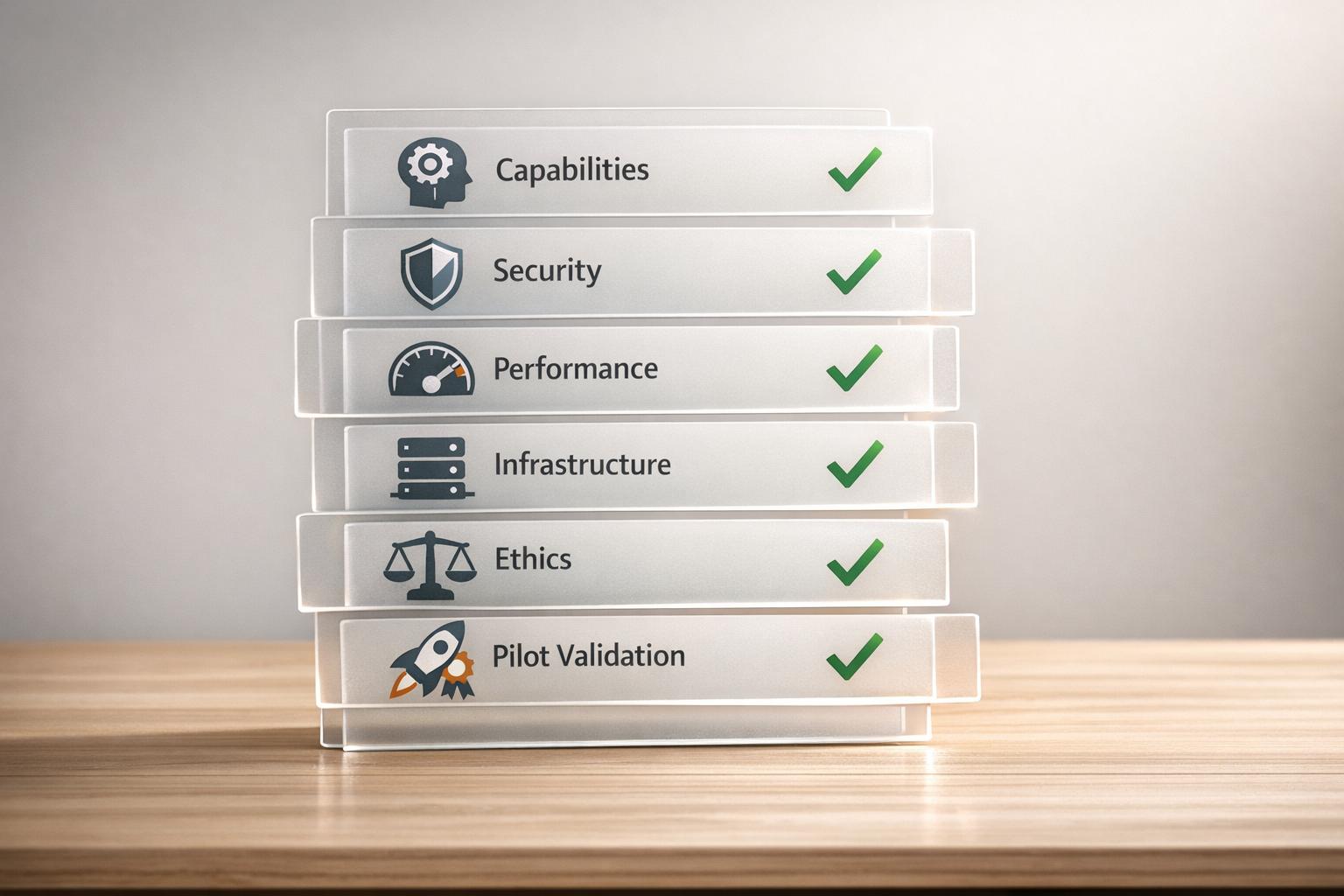
- Capabilities: Ensure the agent handles tasks effectively, integrates with systems, and performs reliably under real conditions.
- Security: Implement access controls, encryption, and compliance measures to protect sensitive data.
- Performance: Test speed, accuracy, and consistency. Use metrics like task success rates (90%+ recommended) and latency benchmarks.
- Infrastructure: Confirm compatibility with your technical setup, including compute, storage, and scaling needs.
- Ethics: Detect and address biases, calibrate confidence levels, and engage diverse stakeholders for oversight.
- Validation: Use pilot programs, stress testing, and structured evaluation to identify and fix issues before full deployment.
Key takeaway: A structured, checklist-driven approach reduces risks and improves success rates by 78%. Follow these steps to ensure your AI agent is ready for production.
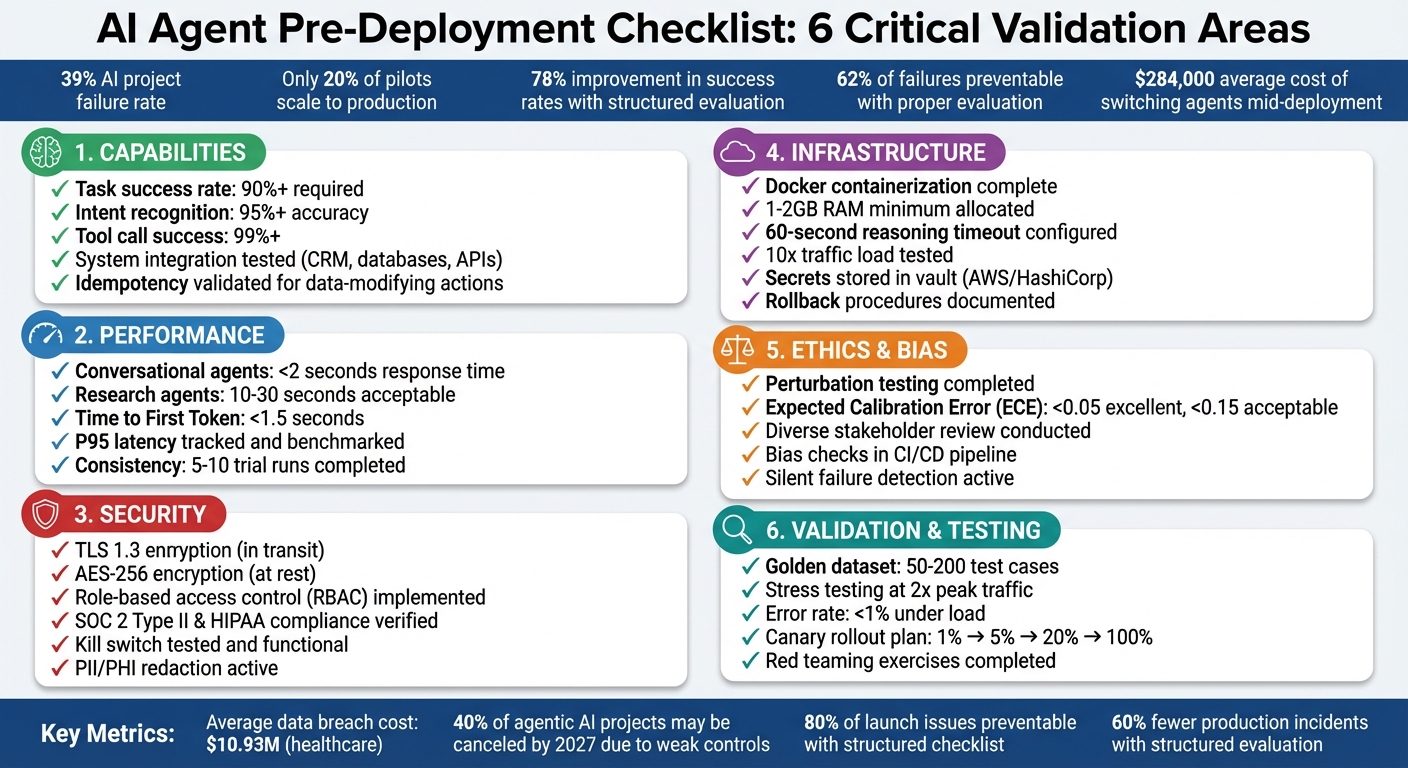
AI Agent Pre-Deployment Checklist: 6 Critical Validation Areas
How to Build and Ship your First AI Agent: Before you Build
sbb-itb-8bb7924
Evaluating AI Agent Capabilities
To ensure your AI agent can effectively handle business tasks, focus on three key areas: industry-specific functions, system integration, and performance in practical scenarios. Below, we’ll break these down with real-world examples.
Industry-Specific Functions
First, verify that the agent can handle tasks that are repeatable, rule-based (following established guidelines), and measurable (producing clear, verifiable results). For example:
- Marketing teams might use AI for competitor monitoring and generating summary reports.
- Customer support agents should classify inquiries and draft responses.
- Finance departments could rely on AI to process refunds or manage billing tasks accurately.
For tasks involving higher stakes - like sending external emails, processing payments, or deleting data - introduce human-in-the-loop approval gates. This ensures oversight where errors could have serious consequences. On the other hand, low-risk, reversible tasks can be handled autonomously. Always align the level of autonomy with the potential risk of the task.
Beyond task execution, the agent must integrate smoothly with your existing systems to function effectively.
System Integration and Autonomous Operation
A well-integrated AI agent is crucial for operational success. The agent should connect seamlessly with tools such as CRMs, analytics dashboards, or internal databases like Notion or Slack. To test these integrations, use mocks for third-party APIs and record/replay fixtures. This helps confirm predictable behavior while avoiding flaky results [3]. Don’t just test ideal conditions - evaluate how the agent handles challenges like API timeouts, malformed JSON responses, or limited permissions [11].
For tasks that modify data or state - such as charging customers or updating records - validate idempotency. This means repeating the same action shouldn’t create duplicates or errors [2][10]. Additionally, every action that alters data must have a rollback plan that automatically reverses changes if something downstream fails.
Performance Testing
Assess the agent’s speed, accuracy, and reliability. For example:
- Conversational agents should respond in under 2 seconds to maintain a smooth user experience.
- Research or analysis agents can allow for longer response times, typically between 10–30 seconds.
Track metrics like p95 latency (the time within which 95% of responses are completed) to identify outliers that could disrupt user satisfaction [11].
Since AI agents are inherently non-deterministic, run tasks multiple times - ideally 5–10 - to measure consistency. Use metrics like pass^k (the probability that all k trials succeed) to gauge reliability [12]. Consistency is critical, as structured evaluation frameworks have been shown to improve deployment success rates by 78% [6]. Set clear benchmarks, such as requiring a task success rate of at least 90% before moving to production [11].
Checking Compatibility and Infrastructure
Before rolling out an AI agent, it’s crucial to ensure it fits your business goals and technical setup. Skipping this step can lead to expensive errors - 62% of failed AI agent deployments could have been avoided with proper upfront evaluation [6]. On average, switching agents mid-deployment costs around $284,000 per project [6].
Business Goal Alignment
Begin by defining clear and measurable outcomes that align with your product goals. Success metrics like task completion rates, accuracy levels, or specific KPIs are essential [5]. For instance, if your goal is automating customer refunds, you might set a target like, "process 95% of standard refund requests without human intervention."
Don’t overlook the total cost of ownership (TCO). This includes not only license fees but also expenses for infrastructure, data preparation, API maintenance, and ongoing training [6][15]. Companies that achieve strong ROI are twice as likely to have redesigned their workflows end-to-end before deploying an agent [17]. This means rethinking processes entirely, rather than just inserting an agent into existing systems.
To avoid overcommitting, start small with pilot tests [6][16]. These allow you to confirm assumptions and refine the agent’s functionality before scaling up. Also, ensure that the vendor’s development roadmap and stability align with your long-term strategy [6].
Technical Requirements
Once your business goals are set, evaluate whether your technical infrastructure can support the agent’s needs. This includes compute, storage, and communication capabilities. For compute, stateless agents work well with serverless options like AWS Lambda or Google Cloud Run. If your agent requires consistent environments, consider containerized deployments using ECS or Kubernetes [18].
Containerize with Docker early in the process to maintain consistent environments across development, staging, and production [17]. This avoids the common "it works on my machine" problem. Set reasoning timeouts to approximately 60 seconds for multi-step tasks, as the standard 30-second API timeout often isn’t enough for complex processes [18][17].
For storage, use Redis for handling short-term session states and conversation history, vector databases like Pinecone or Weaviate for semantic memory, and traditional databases for structured data [18]. Most LLM-powered applications require at least 1–2GB of RAM for smooth production performance [17].
To ensure safety, implement a kill switch to halt operations instantly if issues arise [2][10]. Store API keys securely in tools like AWS Secrets Manager or HashiCorp Vault, and use egress controls to limit the agent’s domain access [18][2].
Scaling and Multi-Agent Coordination
Once your infrastructure is solid, design your system to scale efficiently. Test whether the agent can handle 10x traffic increases and operate within multi-agent networks as your needs grow [15][17]. Stateless agents, which store history in databases rather than memory, allow for horizontal scaling and better load balancing [15].
For more complex scaling, consider the "Supervisor + Workers" pattern, where a supervisor agent breaks tasks into smaller steps, and specialized worker agents handle each part [14]. This setup is often more reliable than relying on a single agent to manage everything. Use retry logic with exponential backoff and circuit breakers to handle API timeouts and service interruptions [15][10].
Ensure idempotency for tool calls, meaning repeated executions produce the same result [14][10]. Employ semantic versioning for prompts and tool definitions, so you can roll back quickly if a new update negatively impacts performance [15][10].
Security and Regulatory Compliance
To ensure your AI agent operates safely and responsibly, it's crucial to establish strong security measures and adhere to regulatory standards.
Security breaches can be incredibly costly. In healthcare alone, the average data breach now costs $10.93 million [21]. Even more alarming, over 40% of agentic AI projects may be canceled by 2027 due to weak risk controls [8]. Before going live, focus on securing access, protecting data, and setting clear governance rules.
Access Control Setup
Every AI agent should have its own unique identity and a designated human owner [19][22]. As Microsoft EVP Charlie Bell puts it, "It starts with identity." [19]. Avoid shared service accounts - individual credentials for each agent are essential for traceability and accountability.
Use role-based access control (RBAC) to fine-tune permissions. Instead of granting broad access, restrict actions to specific tasks. For instance, rather than allowing general access to SharePoint, permit only read-only access to a specific folder [19][23]. For high-risk activities like bulk data deletion, financial transactions, or changes to identity and access management (IAM), require human-in-the-loop (HITL) approval before the agent can proceed [22][23]. Actions can be categorized as follows:
- Auto-allow: For safe, read-only tasks.
- Log-and-allow: For minor write operations.
- Require approval: For high-stakes actions that could lead to significant consequences [8].
Data Encryption and Storage
Data security starts with encryption. Use TLS 1.3 for data in transit and AES-256 encryption for data at rest, including databases, logs, and credentials [20][21]. Protect sensitive information like API keys and secrets by storing them in dedicated secrets managers - such as AWS Secrets Manager or HashiCorp Vault - rather than in plaintext or configuration files.
Ensure your vendors comply with SOC 2 Type II and HIPAA standards to avoid regulatory penalties. For HIPAA compliance, data often needs to be stored within the United States. If you're using cloud-based large language models (LLMs) like OpenAI or Anthropic, confirm they have signed a Business Associate Agreement (BAA) for HIPAA or a Data Processing Agreement (DPA) for GDPR compliance [20][21].
To minimize risk, redact PII (Personally Identifiable Information) and PHI (Protected Health Information) before it reaches the AI model. This reduces both compliance risks and the potential for sensitive data exposure if the agent is compromised [20][21].
Governance and Activity Logs
A strong governance framework is essential for managing AI agent activity. Define clear decision boundaries and establish escalation procedures. Set limits on API usage, execution times, and the number of API calls per hour to control costs and prevent misuse. For instance, you could restrict API usage to 100 calls per hour and cap reasoning timeouts at 60 seconds for complex tasks.
Keep detailed logs of every step the agent takes - this includes the initial prompt, the model's reasoning process, tool calls, outputs, and final results. Use structured logging formats like JSON with consistent trace IDs for efficient querying and seamless integration with Security Information and Event Management (SIEM) systems. Logs should include critical details such as the agent's identity, the tools used, the target resource, and the rationale behind policy decisions. Immutable audit trails with tamper detection (e.g., hashing) are a must [21][23].
Finally, have a kill switch in place - a single command or dashboard button that can immediately disable an agent’s credentials and halt all operations if something goes wrong.
These foundational steps prepare your AI agent for rigorous testing and validation.
Ethics and Performance Measurement
When it comes to AI operations, ethical practices and clear performance metrics are just as important as robust security. Fairness and reliability aren't just buzzwords - they're essential. Here's a striking statistic: 62% of failed AI agent deployments could have been avoided with proper evaluation [6]. On the flip side, businesses using structured evaluation frameworks report 78% higher success rates [6]. Before rolling out your AI agent, it's crucial to ensure it performs fairly for all user groups and meets well-defined standards.
Bias Detection and Mitigation
Detecting and fixing bias requires more than just surface-level checks. One effective method is perturbation testing, where you systematically adjust key attributes like age, gender, race, or geographic location while keeping everything else constant. If the AI's decisions change based on these shifts, you've uncovered a bias that needs addressing.
Another key factor is confidence calibration. If your agent claims 95% confidence but delivers only 60% accuracy, it risks misleading users. To measure this, calculate the Expected Calibration Error (ECE) - an ECE score below 0.05 is excellent, but anything above 0.15 signals the agent isn't ready for high-stakes tasks. To dig deeper, deploy a "judge" model to evaluate the agent's reasoning for potential bias or inappropriate tone. Engage diverse stakeholders - patients, administrators, IT staff, and ethicists - to define acceptable risk levels and identify which demographic factors need closer scrutiny.
Be on the lookout for silent failures, where the agent arrives at the right answer but through biased or flawed reasoning. The process matters just as much as the outcome. To keep things in check, integrate bias and fairness checks directly into your CI/CD pipeline. If fairness scores dip below a set threshold, the build should fail automatically. Once bias is addressed, focus on setting clear performance benchmarks to measure the agent's reliability.
Setting Performance Benchmarks
To ensure reliable operation, establish measurable benchmarks across three key areas: system efficiency (e.g., latency and cost), session-level success (such as task completion and trajectory quality), and node-level precision (like accurate tool usage and sound reasoning) [13][25]. Metrics like task success rate - the percentage of objectives completed correctly - and plan adherence help confirm the agent follows the intended sequence of actions [24][25].
"The evaluation metrics used for large language models (LLMs) - such as perplexity, BLEU scores, or simple thumbs up/down user feedback - do not suffice for assessing autonomous agents." - Benazir Fateh and Amy Liu, Google Cloud [24]
Additionally, track cost per successful task rather than just token usage and monitor end-to-end latency, from the initial prompt to the final result [24][25]. For safety, measure the agent's "defiance rate" - how often it correctly rejects harmful prompts - and ensure that PII detection mechanisms are effective in preventing data leaks [24][25]. Set clear thresholds, such as achieving over 90% task completion or keeping latency under 2 seconds, to create a solid foundation for pilot testing.
Pilot Programs and Feedback Collection
Once benchmarks are in place, pilot programs serve as a real-world testing ground. These small-scale trials help identify and resolve issues before a full-scale launch. Because AI agents are inherently non-deterministic, use aggregated metrics like pass^k (the likelihood of success across multiple trials) to evaluate consistency [12]. For high-risk tasks, implement human-in-the-loop (HITL) workflows to prevent irreversible errors and gather expert feedback on the agent's decision-making [2][27].
Conduct red teaming exercises to test the agent's resilience against vulnerabilities like prompt injections, PII leaks, and ethical guideline breaches [27][11]. Categorize pilot failures into actionable groups, such as "Incorrect tool selection", "Hallucinated data", or "Infinite retry loops", to streamline improvements [11]. Use metamorphic testing by rephrasing questions; inconsistent answers indicate a high risk of hallucination [12].
Establish clear go/no-go gates to determine readiness for deployment, such as "Zero P0 safety violations in the last 100 runs" [27][11]. Cap resource usage by setting limits on steps, tool calls, or tokens per task to flag inefficiencies [27][11]. Finally, compile a "golden dataset" of 50–200 real-world cases from pilot interactions and failures. This dataset becomes a critical regression suite for evaluating future updates [11][26].
Testing and Validation Procedures
After initial evaluations of capability, compatibility, and ethics, testing and validation confirm whether an agent is ready for deployment. This process involves benchmarks, pilot tests, and rigorous assessments to ensure the agent's performance meets production standards. Simulation-based testing can uncover 85% of critical issues before deployment [28], and organizations using structured evaluation frameworks report 60% fewer production incidents compared to those relying on ad-hoc methods [28]. Continuous testing helps identify production-ready agents while flagging those that need further refinement.
Accuracy and Stress Testing
Start by creating a "golden set" of 50–200 test cases that mimic real-world scenarios. Update this set monthly to keep it relevant [11][29]. Divide the test cases into three categories:
- Happy path: 15–25 core intents that represent typical user interactions.
- Edge cases: 10–20 scenarios that push boundaries and test limits.
- Adversarial cases: 5–10 intentional failure scenarios to test resilience [29].
Focus on trajectory evaluation, which examines the entire sequence of actions the agent takes - from tool usage and argument selection to decision-making steps. As StackAI puts it:
"The 'trajectory' is the full trace of what the agent did: which tools it called, in what order, with what arguments, what came back, and how it decided next steps" [27].
This method ensures you’re not just measuring correct answers but also verifying reliable processes.
For stress testing, simulate potential failures like API timeouts, malformed JSON, and outdated data to ensure the agent handles issues gracefully [27][11][7]. Test its performance under heavy traffic to confirm stability during spikes, and verify that resource limits (e.g., CPU, memory, API rate caps) prevent runaway processes that could escalate costs [2][11]. Measure response times using both p50 and p95 latency metrics to ensure they meet targets, and confirm that kill switches and human escalation mechanisms function as intended when confidence levels drop [27][11][2][7].
Once stress tests validate the agent’s resilience, shift focus to ongoing monitoring during live operation.
Monitoring and Tracking Systems
A robust monitoring system is essential for identifying issues that may not trigger traditional alerts. Use a four-layer monitoring stack:
- Infrastructure metrics: Track uptime and API latency.
- LLM call tracing: Monitor inputs, outputs, and token usage.
- Agent workflow tracking: Log step counts and tool outcomes.
- Quality monitoring: Use model-based graders to evaluate a sample of production outputs [30].
Traditional monitoring methods often miss silent quality degradations, which can be more damaging than outright failures. As Agent-Harness.ai notes:
"An agent that's up and responding but producing wrong answers is worse than an agent that's down, because users trust the wrong answers" [30].
To address this, implement distributed tracing to capture complete workflows and identify where reasoning chains fail. Log every agent step - including step number, type, token count, tool details, and timing - in structured JSON for automated analysis. Use rolling baselines instead of fixed thresholds; for example, alert when metrics exceed twice the 7-day median to account for changes in model behavior [30]. Running model-based graders on 5–10% of production traffic provides enough data for quality tracking without incurring excessive costs [30][1].
Staging Environment and Rollback Plans
After validation, ensure a smooth transition to production by maintaining strict separation between development, staging, and production environments. Use the same Docker image or immutable artifact across all stages to avoid inconsistencies - promote tested images rather than rebuilding them for production. For testing, rely on sanitized data that mirrors production conditions without exposing real customer PII. Use mocked third-party APIs to minimize test flakiness.
Version control is critical. Track changes to system prompts, tool definitions, model identifiers, and sampling parameters. Deploy updates cautiously using canary rollouts - start with 1–5% of traffic, monitor for 30–60 minutes, and gradually scale up. For sensitive operations like financial transactions, ensure idempotency and define compensating actions (e.g., issuing refunds for failed charges).
Test rollback procedures in staging by simulating failures to confirm that state-modifying operations can be reversed as intended. Set automated rollback triggers based on metrics like error rates, quality scores, and unexpected cost increases. Define "must-never-happen" events, such as unauthorized data access, that will immediately block a release regardless of other metrics. This layered approach ensures both safety and reliability during deployment.
Pre-Deployment Checklist
Before launching your AI agent, it’s crucial to consolidate all your testing into one final review. According to research, 80% of AI agent launch issues can be avoided by following a structured checklist [32]. Yet, fewer than 20% of AI pilots successfully scale to full production [1]. The difference lies in ensuring every critical detail - capabilities, security, and pilot results - has been thoroughly validated and documented. Below are the key steps to confirm your agent is ready for production.
Capability Confirmation
Start by verifying that your agent’s core functions meet production standards. Aim for at least 95% intent recognition accuracy and 99% success in tool calls when tested against historical user data [32]. Double-check that all external services have been stress-tested for reliability and rate limits.
"POCs are built to impress. Production systems are built to survive" [9].
Make sure your performance benchmarks align with your business goals, whether that’s cutting handling time by 50% or achieving 90% accuracy in resolving specific ticket types [7]. Key performance metrics include keeping Time to First Token under 1.5 seconds and ensuring full responses for simple tasks stay below 5 seconds [32]. To test robustness, run stress tests at double your expected peak traffic to confirm the agent maintains an error rate below 1% [32].
Security and Compliance Review
Security should never be an afterthought. Confirm that all security controls - like prompt injection defenses, input/output filtering, and PII redaction in logs - are active and functioning. Role-based access controls should enforce the principle of least privilege [10][32]. Ensure all credentials are encrypted and dynamically injected at runtime using a secrets manager [7][10].
With the average cost of a data breach now exceeding $4.4 million [7], vulnerabilities like prompt injection - which affect over 73% of production deployments - must be addressed [8]. Test your kill switch to ensure it works as intended, and verify that high-risk operations include rollback procedures and human-in-the-loop approval gates [10][8].
Pin your model versions explicitly (e.g., gpt-4-0613 instead of gpt-4) to avoid unexpected behavior changes from provider updates [8]. Additionally, set strict budget limits for API tokens and execution time per request to prevent runaway costs [10].
Pilot Results Assessment
Your pilot results are the final checkpoint for operational readiness. Review golden queries, tool-path assertions, and multi-step execution tests to detect any silent behavior drift before going live [9]. Compare pilot task success rates against pre-automation baselines to ensure the agent is delivering measurable improvements [7][1].
Analyze potential degradation triggers. For instance, if response times exceed 3 seconds, confirm that non-core features can disable automatically. Similarly, if error rates hit 5%, verify that the system can switch to a backup model [32].
Plan for a gradual rollout. Start with 1% of traffic for internal employees, then expand to 5% for beta users, followed by 20% for broader monitoring, before going all-in on full deployment [32]. Define clear failure thresholds - such as acceptable error rates and cost limits - that would signal the need for a pivot or shutdown [31].
"The release checklist ensures every AI agent is secure, compliant, and trained on high-quality data so it can automate interactions with confidence" [4].
Conclusion
Deploying an AI agent is not a one-and-done task - it’s an ongoing process that requires resilience and adaptability. Thorough validation is critical, as studies show that proper evaluation can prevent 62% of failures. On the flip side, switching agents mid-deployment can rack up costs of around $284,000 [6].
When working through your checklist, focus on three key areas: agent capabilities, security controls, and performance validation. Security measures should include strong authentication, runtime encryption for sensitive credentials, and a reliable kill switch [10]. For performance, pilot tests like canary deployments - starting with just 5% of traffic - offer a safe way to validate functionality [15]. Since production rollouts are still relatively rare, the transition from proof-of-concept to production remains a major hurdle for many projects.
"Production readiness isn't about perfection. It's about having control over how agents behave, visibility into what they're doing, and intentional design choices."
- Julie Collado-Buaron, Content Strategist, Unity Communications [7]
AgentBandwidh is a platform designed to tackle these challenges head-on. Its domain-specific agents are built with production-grade architecture from the start. Whether it’s JobVantage for recruitment automation or ClaimPath for health insurance appeals, these tools feature real-time telemetry, modular integration, and multi-agent coordination. The platform’s autonomous network supports high-throughput operations while ensuring observability and control - features trusted by 89% of production teams [17].
Errors, especially data breaches, can be costly - averaging over $4.4 million per incident [7]. A structured, checklist-driven approach can mitigate these risks. Companies that follow such frameworks report 78% higher success rates [6]. By sticking to these guidelines, you can build a deployment strategy that prioritizes operational efficiency, strong security, and ethical performance.
FAQs
What tasks should an AI agent automate first?
AI agents are best suited to take on tasks that are repetitive, follow clear rules, and occur in high volumes. These types of tasks offer quick improvements in efficiency while lightening the load for human workers. For instance, they can handle data entry, routine customer support like answering FAQs, scheduling, and basic decision-making. Focusing on these straightforward, well-defined tasks first ensures reliable outcomes, reduces risks, and establishes trust before moving on to more advanced automation efforts.
How do I set the right human-approval gates?
To create effective human-approval gates, it's crucial to establish clear criteria for when human intervention is necessary, particularly for high-stakes actions such as financial transactions or modifying sensitive data. The decision to require approval should focus on the potential impact of the action, rather than simply relying on organizational hierarchy.
Best practices include:
- Incorporating human reviews at key decision points to catch potential errors or risks.
- Defining guardrails to safeguard sensitive operations and prevent unauthorized changes.
- Keeping detailed audit logs to promote accountability and transparency, ensuring a balance between automation and human oversight.
This approach not only enhances security but also ensures critical decisions are carefully evaluated.
What should I monitor after the agent goes live?
After deployment, keep an eye on critical metrics such as response quality, error rates, latency, token usage, tool functionality, safety measures, and operational performance. These indicators are crucial for ensuring the agent performs reliably and efficiently in a live environment. Regular monitoring helps identify and resolve issues quickly, maintaining consistent performance.