
10 Ways AI Agents Automate Daily Business Tasks
AI agents are transforming how businesses handle repetitive tasks by automating processes that previously required significant manual effort. From managing job applications to monitoring networks, these tools save time, reduce errors, and improve efficiency. Here's a quick look at how AI agents are making an impact:
- Job Applications: Automate recruiting tasks like sourcing, screening, and scheduling.
- Market Analysis: Detect price differences and adjust strategies in real-time.
- Legal Deadlines: Track court schedules and handle document processing.
- Content Production: Simplify creative workflows with task-specific AI tools.
- Insurance Claims: Process appeals and reduce turnaround times.
- Equity Management: Automate cap tables, valuations, and reporting for startups.
- Meal Planning: Generate grocery lists and reduce food waste.
- Subscription Management: Audit recurring charges and optimize costs.
- Real-Time Monitoring: Consolidate operations into a single dashboard.
- Network Management: Resolve issues autonomously and optimize workflows.
These tools save over 40 hours per month per function, allowing teams to focus on higher-value work. Businesses can start small by automating specific tasks and scale as needed, ensuring measurable results and a clear return on investment.
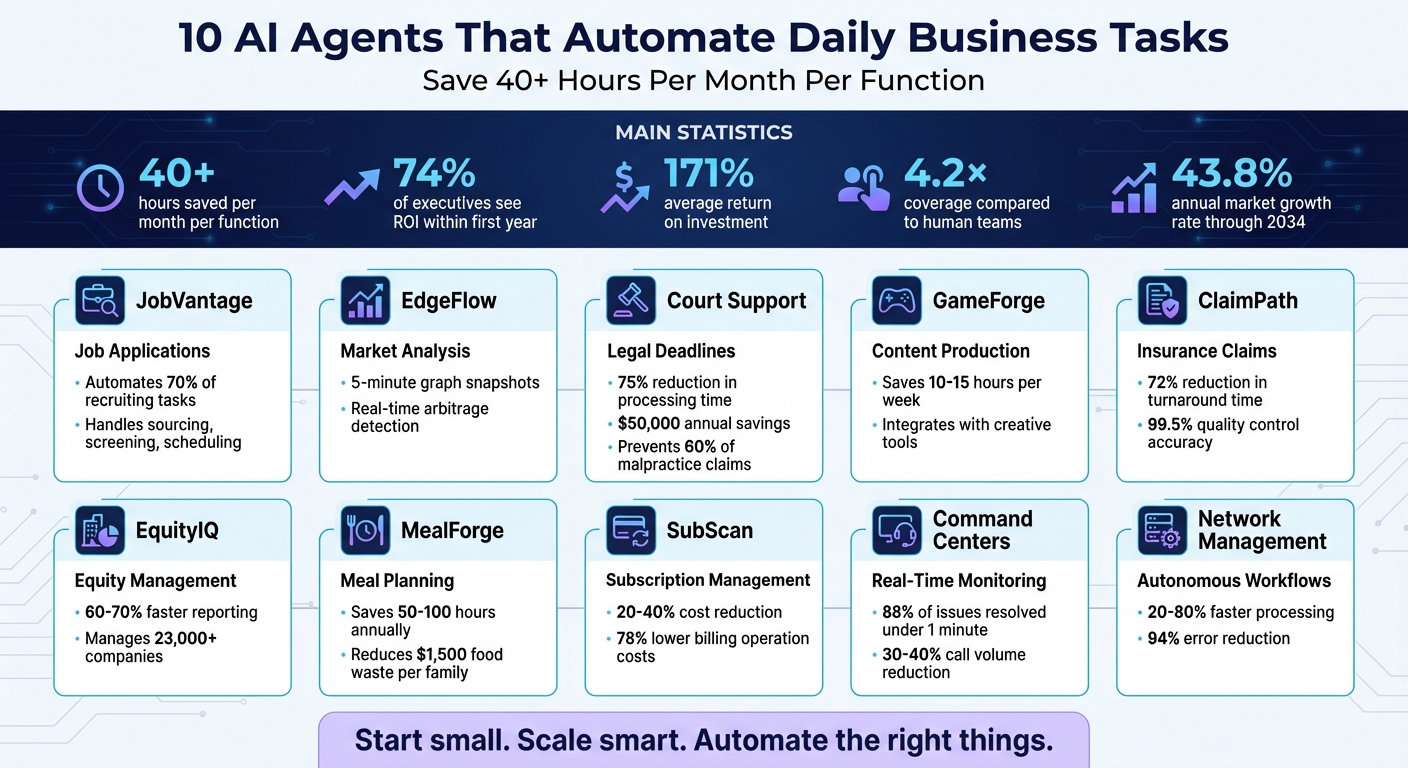
10 AI Agents That Automate Business Tasks: Time Savings and ROI Statistics
1. Job Discovery and Application Automation with JobVantage
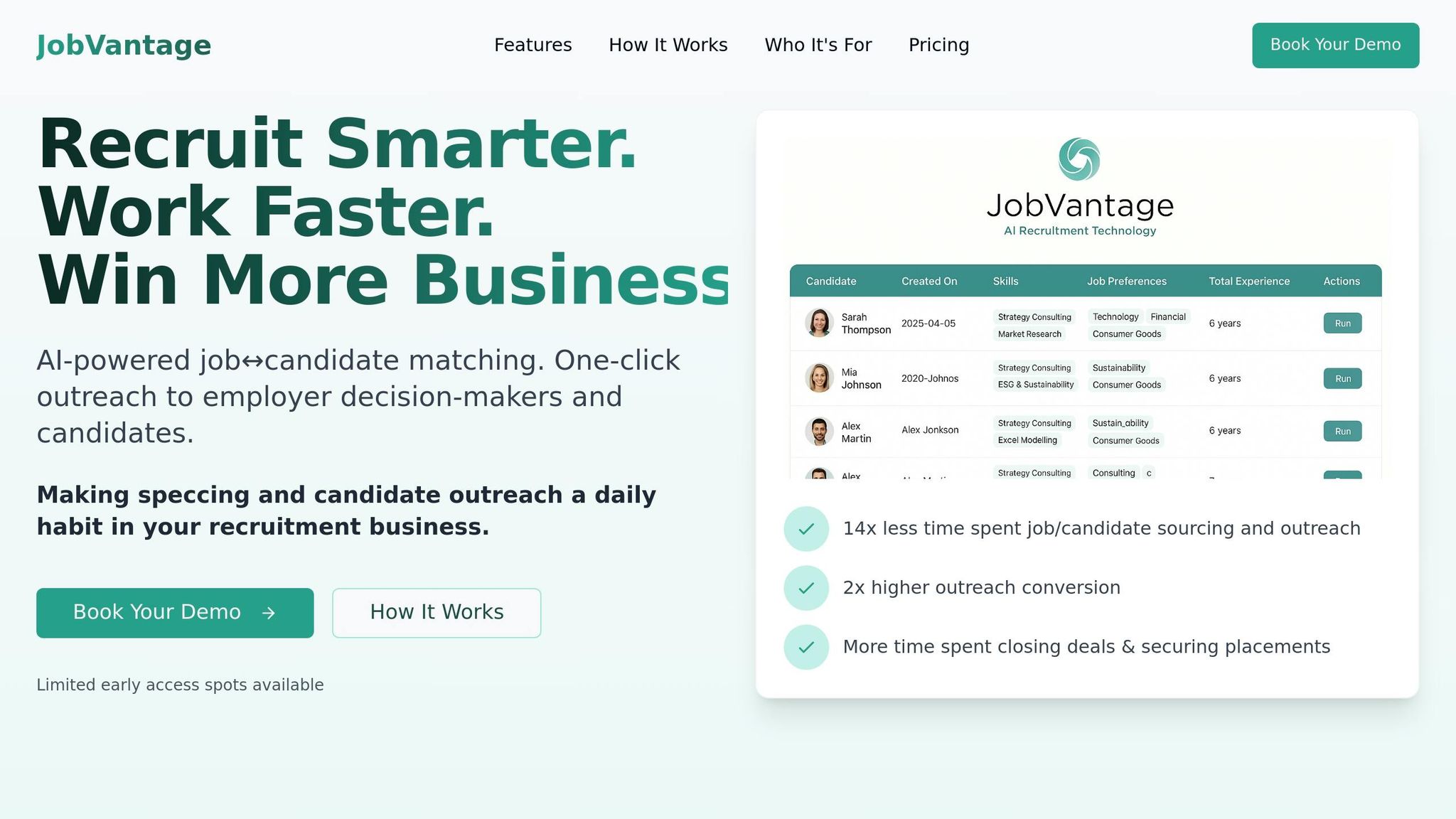
Task-Specific Automation Capabilities
JobVantage takes the heavy lifting out of job searching and recruitment by automating application submissions on a massive scale. Instead of spending days sending out applications, this tool can handle hundreds in just minutes.
But it’s not just about copying and pasting. JobVantage tailors responses to detailed screening questions by pulling relevant information straight from resumes and supporting documents [8][9]. When dealing with Applicant Tracking Systems (ATS) like Workday, Greenhouse, SmartRecruiters, and Lever, it adapts smoothly to each system's unique setup, ensuring every required field is completed [9].
Efficiency Improvements in Daily Business Operations
By automating 70% of repetitive recruiting tasks - such as sourcing, screening, scheduling, and ensuring compliance - JobVantage allows teams to focus on building meaningful relationships [10]. It evaluates candidates against specific role requirements, identifying must-haves and deal-breakers to create ranked shortlists supported by clear evidence. This approach reduces reliance on gut instincts and helps minimize bias in hiring decisions [10][11].
Scheduling is another area where JobVantage shines. It handles calendar coordination, time zones, and resource management without the endless back-and-forth of email chains. This streamlined process speeds up hiring timelines significantly [10]. Its automation capabilities also pave the way for broader improvements in other areas of business.
Ease of Integration with Existing Systems
JobVantage integrates effortlessly with existing tools using Universal Connectors. These connectors link the platform to ATS solutions, calendars, email systems, and HRIS platforms [10]. Using REST or GraphQL APIs, it works alongside your current systems without requiring a complete overhaul [10]. Beyond ATS integration, it connects with tools for assessments and background checks, ensuring a smooth workflow across multiple platforms [10].
sbb-itb-8bb7924
2. Market Analysis and Arbitrage Detection with EdgeFlow
Task-Specific Automation Capabilities
EdgeFlow takes automation to the next level by simplifying market analysis. Using a Graph Neural Network (GNN) framework - specifically GraphSAGE with custom edge fusion - it generates 5-minute graph snapshots from platforms like KuCoin, Gate.io, Huobi, Bitget, and MEXC to pinpoint price discrepancies quickly [12]. It analyzes edge features such as log-transformed exchange rates, trading volumes, volatility, and fees to fine-tune arbitrage detection. For traders looking for more, the Pro version syncs trades across more than 10 platforms and enriches them with external data sources like Yahoo Finance, making it easier to uncover a trader's unique "edge" [13].
Efficiency Improvements in Daily Business Operations
EdgeFlow’s autonomous operation eliminates the need for constant oversight. It processes complex datasets and takes action based on performance metrics [14]. By tracking real-time signals - like demand fluctuations, inventory levels, and competitor pricing - it dynamically adjusts strategies and pricing models [15][16]. Unlike traditional automation tools that rely on rigid rules, EdgeFlow uses contextual intelligence to handle exceptions and adapt to broader market conditions.
Scalability for Businesses of Varying Sizes
Whether you’re a solo trader or running a large enterprise, EdgeFlow adapts to your needs [17]. For smaller teams, it’s a game-changer, allowing just three people to achieve what might normally require a team of 10 [19]. It also integrates seamlessly with various software systems, managing multi-step workflows without manual intervention [18][19]. This real-time, scalable approach showcases how AI can simplify even the most complex operations for businesses of all sizes.
3. Legal Procedure and Deadline Tracking with Court Support
Task-Specific Automation Capabilities
Court Support brings a new level of efficiency to legal workflows by automating some of the most tedious tasks. It handles legal document processing and deadline tracking with precision and speed. For instance, the system can read Electronic Case Filing (ECF) notices from federal PACER and state courts, download linked PDFs, and upload them to document management systems - all within seconds [20][21]. Using advanced computer vision and patent-pending technology, it extracts dates and deadlines from even the most intricate scheduling orders. This includes handwritten notes and relative date calculations like "X days before trial", ensuring accuracy [22][23][24]. Beyond that, it classifies filings (e.g., motions, declarations, exhibits), pulls critical data such as case numbers and party names, and checks this information against local court rules for compliance.
Efficiency Improvements in Daily Business Operations
Routine legal tasks can be time-consuming, but Court Support significantly reduces the time spent on these processes. For example, it cuts document processing time from 5 minutes to just 30 seconds. This results in a 75% reduction in overall processing time, saving firms around $50,000 annually in manual data entry costs [23][26]. The system also keeps a close eye on statutes of limitations, court deadlines, filing dates, and discovery cutoffs for active cases. It sends timely alerts to prevent missed deadlines - a crucial feature, considering that 60% of legal malpractice claims are tied to deadline oversights [28].
"Legal work is deadline-driven, document-heavy, and detail-obsessed. Every missed deadline is malpractice risk." – Lazarus [25]
Another standout feature is its automated conflict detection, which flags potential scheduling overlaps and legal conflicts early in the intake process. This alone can save 48–72 hours of manual review. Firms using Court Support often see a threefold increase in document handling capacity without needing additional staff. Additionally, document review preparation time typically drops by 30% to 60% [27].
Scalability for Businesses of Varying Sizes
Court Support is designed to adapt to the needs of legal practices, whether small firms managing 50 filings daily or larger operations dealing with over 5,000 documents a day [23]. It integrates seamlessly with widely used tools like Outlook, Google Calendar, Slack, Zoom, Microsoft Teams, and major case management systems. This means attorneys can stick to their familiar platforms without requiring extensive retraining, making it easier for firms to improve productivity across the board.
4. Creative Workflow Automation with GameForge
Task-Specific Automation Capabilities
GameForge takes creative workflows to the next level by managing tasks like data research, drafting platform-specific content, and ensuring brand guidelines and character limits are met [1][18]. Instead of sidelining human creativity, it complements it by organizing tasks related to brainstorming, branding, and production [32]. To keep projects on track, GameForge assigns AI roles that mimic real creative team members, such as Strategist, Creative, and Critic [32]. This approach simplifies project management while keeping the creative process intact.
Efficiency Improvements in Daily Business Operations
By automating project management essentials - like approvals, task follow-ups, and syncing data across platforms - GameForge cuts down administrative work by 10–15 hours per week [31]. It also flags potential delays for managers, ensuring smoother operations. In game development, GameForge adds value by exporting audio with metadata for spatial engines like FMOD and Wwise, and it integrates with robust infrastructure like AWS Bedrock to ensure reliable production workflows [29].
Ease of Integration with Existing Systems
GameForge works seamlessly with popular tools such as Figma, Adobe Firefly, Midjourney, and Adobe Lightroom. This compatibility enhances visual ideation and layout exploration without disrupting established workflows. The result? A more efficient creative process that fits right into existing systems.
Scalability for Businesses of Varying Sizes
Whether you're an indie team or a large studio, GameForge adapts to your needs. It allows smaller teams to produce work at AAA standards while helping larger studios maintain consistency across multiple titles - all without requiring additional hires [29][30]. GameForge shows how even the most creative tasks can be streamlined, making it a powerful tool for businesses aiming to optimize their operations.
5. Health Insurance Appeal Processing with ClaimPath
Task-Specific Automation Capabilities
ClaimPath simplifies the process of handling insurance claim denials by automatically identifying CARC/RARC codes from Explanation of Benefits (EOB) documents [33]. Instead of requiring staff to manually review each denial or transfer patient information between systems, the AI agent pulls data directly from Electronic Health Records (EHRs). It then populates insurance portals or clearinghouses with this information [34]. The system also processes essential documents - like Assignment of Benefits (AOB), Date of Treatment (DTP), and Notice of Intent (NOI) - through a single interface. Before submission, it resolves common errors such as missing paperwork, incorrect CPT/ICD-10 codes, or expired authorizations.
Efficiency Improvements in Daily Business Operations
Automation has had a measurable impact on claim processing efficiency. For example, Smart Data Solutions reported a 72% reduction in turnaround time for medical claim queries by using structured machine learning workflows [35]. Another payer noted a 46% decrease in the time spent reviewing authorizations after implementing an automated workflow [37]. ClaimPath enhances this process by validating appeals during pre-processing, eliminating unnecessary reviews, and achieving a 99.5% quality control accuracy rate with human oversight [35].
"Embracing automation in medical appeal processing is a surefire way to improve turnaround time, accuracy, and costs." - Smart Data Solutions [35]
The automation also addresses a key issue: while insurers denied an average of 19% of in-network claims in 2023, only about 1% of those denials were appealed by consumers due to the complexity of the process [36]. ClaimPath tackles this challenge by flagging urgent appeals and tracking jurisdictional deadlines, ensuring no appeal is overlooked. By automating these tasks, staff can focus on more critical aspects of revenue cycle management, leading to greater operational efficiency.
Ease of Integration with Existing Systems
ClaimPath is designed to seamlessly connect with current health insurance systems through APIs, browser-native extensions, and direct connectors for legacy platforms [47–49]. The integration process is often "touchless", requiring little IT intervention. This is because the AI agents operate directly within web browsers, interacting with payer portals in the same way a human would [38]. This compatibility makes it easy to deploy across organizations of different sizes.
Scalability for Businesses of Varying Sizes
ClaimPath’s scalability ensures it can handle the needs of both small practices and large healthcare systems. Whether managing dozens of appeals each month or processing thousands, the system adjusts to fit the workload. Its phased implementation approach begins with simpler, high-volume tasks before expanding to more complex cases. Using Optical Character Recognition (OCR) and Natural Language Parsing (NLP), ClaimPath categorizes correspondence efficiently, maintaining accuracy even as the volume of appeals grows. This adaptability ensures consistent performance regardless of the scale of operations.
6. Startup Equity Modeling with EquityIQ

Task-Specific Automation Capabilities
EquityIQ simplifies equity management for startups, much like how AI agents streamline routine business tasks. With this tool, you can simulate funding rounds in seconds by inputting essential variables like pre-money valuation, investment amounts, and option pools. This eliminates the need for tedious manual updates in spreadsheets [39].
It also automates waterfall analysis by pulling real-time cap table data to calculate proceeds distribution. You can run thousands of sensitivity analyses across variables like revenue, margins, and discount rates. Plus, EquityIQ extracts data from PDFs or screenshots to auto-populate cap tables, significantly reducing the chances of manual errors [39][40][41][43].
Efficiency Improvements in Daily Business Operations
Managing equity manually often becomes unmanageable once a company exceeds 20-30 stakeholders [39]. EquityIQ solves this issue by offering continuous FMV updates through AI-powered 409A valuations, replacing the weeks-long valuation process with near-instant updates [39]. The platform recalculates vested shares automatically, reflecting terminations and transfers without requiring manual input [39].
Its automation capabilities also cut down the time spent compiling performance reports by 60-70% [42]. Tasks like issuing shares and options, which could take hours, are now completed in minutes [39]. Additionally, EquityIQ keeps track of critical regulatory requirements, such as Rule 701 and Form 3921 filings, helping avoid costly penalties. For example, Credit Karma once faced a $160,000 fine for non-compliance with Rule 701 [39]. Today, over 23,000 companies rely on automated cap table solutions to simplify equity management and support their growth [39].
By streamlining these processes, EquityIQ not only increases operational efficiency but also ensures your equity management scales seamlessly as your startup grows.
Scalability for Businesses of Varying Sizes
EquityIQ is built to support startups at any stage of growth. Whether you're a small team of four founders or a more established company managing dozens of angel investors and multiple SAFE notes, the platform adapts to your needs. Its modular agent setup allows businesses to expand their operations without adding unnecessary complexity, ensuring the system aligns with shifting priorities [7].
AI agents within EquityIQ scale instantly to meet growing workloads, eliminating delays, retraining, or performance issues [7]. This gives small teams and fast-scaling ventures the operational power of a much larger workforce - without the added expense of increasing headcount [7][44].
7. Meal Planning and Grocery Management with MealForge
Task-Specific Automation Capabilities
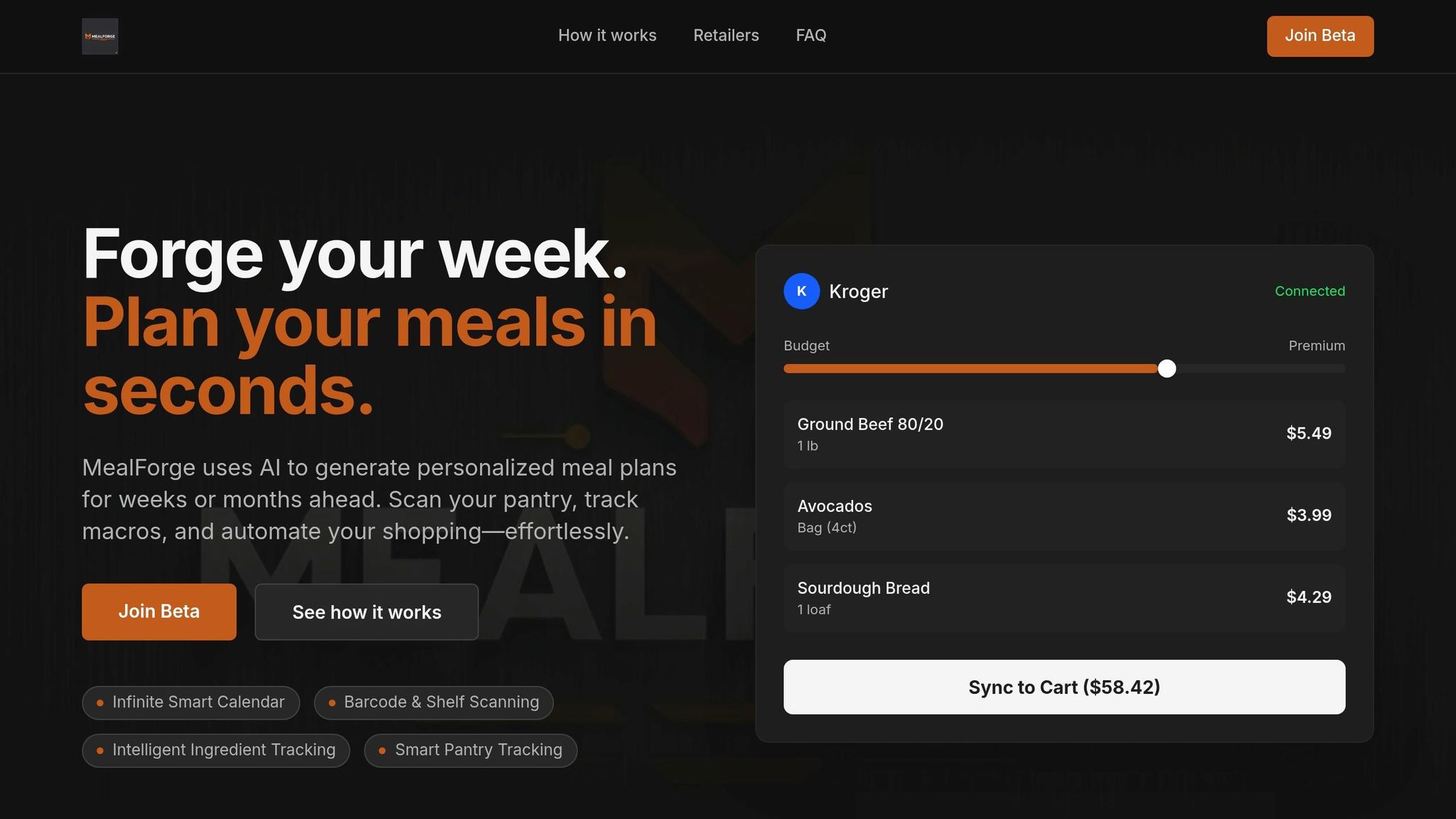
MealForge takes the hassle out of meal planning and grocery management by streamlining the entire process. It creates weekly meal plans customized to your dietary needs, taste preferences, and nutritional goals [46][47]. By scanning recipes, it automatically generates a well-organized grocery list, consolidating duplicate ingredients - like combining multiple calls for onions into a single entry. This ensures precision and helps avoid overbuying [46][47].
The "Cook From Pantry" feature is a game-changer for reducing waste. It crafts meals based on what you already have at home, cutting down on unnecessary trips to the store [46]. MealForge also adapts its suggestions to your schedule, offering quick recipes for busy weeknights and more elaborate options for weekends [47]. If you need to adjust serving sizes - whether for hosting guests or saving leftovers - it recalculates ingredient amounts instantly [46]. Plus, with one-tap Instacart integration, you can send an entire week’s grocery list to your digital cart in seconds [45][46]. These tools make meal planning faster, easier, and more cost-effective.
Efficiency Improvements in Daily Business Operations
MealForge’s automation doesn’t just save time - it transforms how households and businesses manage their meals. Instead of spending 2–3 hours a week planning meals and making lists, users can cut this down to just 10–15 minutes [45][49]. Over the course of a year, this adds up to reclaiming 50–100 hours - time that can be spent on more important tasks.
Food waste is another area where MealForge shines. The average American family wastes about $1,500 worth of food annually due to overbuying or spoilage [47]. MealForge combats this with its "Cook once, eat twice" strategy, which repurposes ingredients across multiple meals [49]. It also integrates seamlessly with digital calendars, adding prep sessions and reminders for defrosting, keeping everything on track without requiring constant oversight [49].
The demand for AI-driven meal planning is growing fast, with the market projected to expand at an annual rate of 28.10% between 2025 and 2034 [46]. And since 51% of employees spend at least two hours daily on repetitive tasks that could be automated [45], tools like MealForge offer a clear path to greater efficiency.
Scalability for Businesses of Varying Sizes
MealForge isn’t just for households - it’s designed to adapt to a wide range of needs. Whether you’re a solo professional, managing a large family, or running a small food business, MealForge can scale to fit your requirements [49]. It factors in kitchen equipment, budget, and cooking skill level (rated on a 1–5 scale) to create meal plans tailored to your specific situation [49].
After just 2–3 weeks of user feedback, the AI becomes fully aligned with your preferences [47]. It can then handle complex dietary requirements, such as medical diets (low-FODMAP or DASH), lifestyle diets (keto, vegan), or religious guidelines (halal, kosher) [49]. Even if your schedule changes or a delivery is missed, MealForge recalibrates the entire plan and shopping list in seconds, ensuring you’re always prepared [48][49].
8. Subscription Auditing and Cost Control with SubScan
Task-Specific Automation Capabilities
SubScan uses smart automation to tackle the headache of managing business subscriptions. It gathers data from various sources like bank statements (via CSV exports), email receipts, app store histories, and OAuth connections to identify recurring charges you might have missed or forgotten about [50]. Ever been puzzled by cryptic merchant names like "AMZN MKTP"? SubScan deciphers those into clear, recognizable labels [52]. It also tracks license usage by monitoring last login dates and feature activity, flagging services that have been inactive for over 30 days [50]. On top of that, it helps businesses spot shadow IT by scanning expense reports and account permissions. It even forecasts upcoming renewals, surprise fees, and the end of promotional rates to keep you ahead of the game [52]. These features simplify financial operations and save time, making subscription management far more efficient.
Efficiency Improvements in Daily Business Operations
Manually tracking subscriptions can eat up 2–3 hours every month. SubScan, on the other hand, takes just 10 minutes to set up and runs automatically [52]. By auditing subscriptions, businesses can cut spending in certain categories by 20–40% through smarter consolidation and eliminating waste. In enterprise settings, a staggering 60–70% of purchased software seats often go unused [50]. Companies adopting AI-driven subscription management see impressive results: billing operation costs drop by up to 78%, billing accuracy improves from 94% to 99.6%, cash collection speeds up by an average of 5.2 days, and month-end close cycles shrink by 40–60% [54][55]. For businesses spending an average of $21 per subscriber monthly on billing operations, these improvements directly boost profitability [54].
Ease of Integration with Existing Systems
SubScan seamlessly connects with existing financial systems. It uses managed OAuth for payment processors like Stripe, secure APIs for ERP systems, and document parsing to handle bank statements [56][57]. Its centralized dashboard provides a clear view of all active subscriptions, eliminating the hassle of sifting through endless bank and credit card statements [51].
Scalability for Businesses of Varying Sizes
SubScan works for everyone - from solo entrepreneurs to mid-sized companies. Small businesses can use it to avoid "subscription creep", where forgotten services quietly renew [50][51]. Larger organizations benefit from automated quarterly audits that review all subscriptions every 90 days [50][53]. For high-value subscriptions costing $500 or more annually, SubScan offers negotiation windows 60–90 days before renewal, giving businesses leverage to secure better terms [50]. And with professional subscription management services priced at around $144 per year, the savings from cutting unnecessary expenses make the investment worth it [52]. SubScan’s adaptability shows how AI can provide tailored solutions for businesses of all sizes.
How to Automate Any Business With AI in 3 Steps (Beginner's Guide)
9. Real-Time Monitoring and Command Center Control
Real-time monitoring has moved beyond simple observation. It now offers a powerful combination of oversight and instant response capabilities, enhancing automated task execution.
Task-Specific Automation Capabilities
AI agents now act as a centralized observability layer, consolidating activities, metrics, and telemetry into a single, intuitive dashboard. This dashboard doesn't just monitor agent health - it also tracks how humans and AI collaborate effectively [58]. Modern command centers take this further with "Session Trace Data Models", which log every interaction, including reasoning steps, LLM calls, and guardrail checks. This level of detail goes far beyond what traditional tools offer [58].
These systems aren't just passive observers. By leveraging intent tags and sentiment analysis, they can categorize conversations in real time. If a problem arises, supervisors can step in immediately, ensuring a seamless human-in-the-loop process. This setup allows for quick corrective action whenever anomalies are detected.
Efficiency Improvements in Daily Business Operations
The results from various industries highlight how these advancements are reshaping operations. For example, in January 2026, Broadcom managed to resolve 88% of IT issues in under a minute. Similarly, the Australian Red Cross scaled its incident monitoring from 30 to an astounding 300,000 incidents per day in December 2025. JPMorgan Chase's Coach AI also demonstrated its potential by enabling a 95% faster client response time [14][59]. Additionally, AI-powered support systems have been shown to reduce call volumes by 30% to 40% [59]. According to Gartner, these efficiencies could lead to labor cost savings of up to $80 billion in the near future [60].
Ease of Integration with Existing Systems
Command centers are designed to bring together data from systems like CRM and ERP, enabling real-time decision-making [14]. The adoption of the Model Context Protocol (MCP) is simplifying the process of connecting enterprise APIs to AI monitoring systems [14]. Pre-built connectors eliminate the need for time-consuming custom development, making integration faster and more straightforward. For instance, AgentBandwidth's command center provides real-time telemetry and visibility across all deployed agents, serving as a single source of truth for managing digital workforces.
Scalability for Businesses of Varying Sizes
AI-powered command centers are built to scale with businesses of all sizes. Small and medium-sized enterprises can benefit from no-code platforms that allow for rapid deployment - often in as little as 15 to 30 minutes - without requiring technical expertise [2][5]. Larger enterprises can leverage more robust solutions that unify agents, data, applications, and metadata into a cohesive digital labor platform. This ensures trust and accountability as operations grow [61]. Additionally, multi-agent orchestration simplifies the management of complex workflows, reducing the likelihood of errors in large-scale operations [18].
10. Autonomous Network Workflow Management
Autonomous network workflow management moves away from static, script-heavy systems, introducing dynamic AI agents that continuously monitor network conditions, form hypotheses, and address issues - all without human intervention[63]. This shift showcases how AI is transforming efficiency across industries.
Task-Specific Automation Capabilities
AI-driven systems excel in managing complex network tasks through multi-agent orchestration. Each agent specializes in specific areas, such as routing, security, or resolving interface errors, while a central orchestrator ensures seamless coordination[62][65]. For instance, an autonomous system once resolved a BGP outage by deploying multiple agents to handle various operating systems. These agents pinpointed an "administrative shutdown" as the root cause and implemented a fix after human review[63]. Engineers can simply state a goal, like "Find why this path is slow", and the AI autonomously investigates, correlates data, and suggests actionable solutions[63].
Efficiency Improvements in Daily Business Operations
By adopting AI-driven orchestration, businesses have seen processing times drop by 20% to 80% in key workflows[62]. In finance, some organizations report an 80% cut in processing time and a 94% reduction in errors for intricate tasks[4]. These systems free up significant time for employees, saving over 2 hours daily per person and more than 40 hours monthly per department[66][4]. Research forecasts that by 2028, about 33% of enterprise software will incorporate AI agents, a sharp rise from under 1% in 2024[62]. As of mid-2025, 79% of organizations have implemented AI agents, with 66% experiencing measurable productivity improvements[64].
Ease of Integration with Existing Systems
Modern integration tools make it easier than ever to incorporate these systems into existing infrastructures. Low-code and no-code platforms allow users to automate complex tasks without needing programming expertise. Natural language prompts enable AI assistants to identify and execute workflows, while a read-only mode provides a safe starting point by generating commands for human review before full automation is activated[63]. Tools like AgentBandwidh offer real-time telemetry and mesh communication with high throughput and low latency, ensuring smooth operations across networks.
Scalability for Businesses of Varying Sizes
Autonomous network solutions are designed to scale for businesses of all sizes. Small teams can implement no-code platforms in minutes, while large enterprises benefit from advanced orchestration engines that manage multiple specialized agents across departments[2][5][4][18]. The market for agent-based AI is expected to grow at a compound annual rate of 43.8% from 2025 to 2034, reaching an estimated $196.6 billion[4]. These systems are particularly beneficial in diverse environments, where they can interpret varying data formats and command-line outputs simultaneously[63]. This adaptability allows businesses to start with one high-value use case and expand as they see returns on their investment[2][6].
Conclusion
AI agents are changing the way businesses handle everyday tasks by taking over repetitive work. Whether it's job discovery, market analysis, legal tracking, or subscription management, these tools can save teams over 40 hours per month per function [4]. That means more time for focusing on strategy, creative projects, and making complex decisions. This shift - from traditional, rule-based automation to intelligent agents that can reason and plan - marks a major evolution in how work gets done.
The article emphasizes a practical approach to AI adoption: start small and scale up thoughtfully. Instead of automating entire roles, focus on specific tasks where the impact is measurable. A simple time audit can help pinpoint bottlenecks. From there, deploying one high-impact use case to demonstrate ROI is a smart first step. This method works - 74% of executives report seeing ROI within the first year [68], with an average return of 171% [68].
"AI agents don't replace jobs. They replace tasks. And not all tasks are agent-ready." - Prateek Vishwakarma, AI Technology Researcher [67]
The tools discussed in this article, such as JobVantage for application automation or autonomous network workflow management systems, show how specialized AI agents solve specific challenges. Whether it's meeting legal deadlines, organizing meal plans, or monitoring network performance, these agents operate around the clock, offering 4.2× the coverage of human teams [3]. With the AI agent market expected to grow by 43.8% annually through 2034 [4], now is the perfect time to explore which tasks in your business are ready for automation.
Start by identifying your team's most time-intensive, repetitive tasks and calculating their costs [19]. Then, target these areas with AI tools that fit smoothly into your existing systems. Begin with low-risk workflows and clear milestones to ensure success. The businesses reaping the most benefits aren’t automating everything - they’re automating the right things.
FAQs
Which business tasks are best to automate first with AI agents?
When deciding which tasks to automate first with AI agents, it's smart to focus on those that are repetitive, time-intensive, and follow clear rules. For instance, automating scheduling meetings, managing calendars, or handling FAQs can quickly lighten the workload. Tasks like data entry, report generation, and customer support (such as responding to FAQs or sorting inquiries) are also excellent candidates. These types of processes not only save time but also help reduce errors while keeping service quality consistent. By starting with high-volume, predictable tasks, you can ensure a smoother transition and make the most of automation right from the beginning.
How do AI agents connect to my existing tools and data?
AI agents link up with your tools and data using integrations and APIs, making communication smooth and straightforward. They rely on pre-built connectors or custom integrations to work with systems like CRMs, email platforms, and collaboration tools. This setup lets them handle tasks such as sending emails, analyzing data, or updating records across platforms like Slack, HubSpot, or Jira. The result? Streamlined workflows that require little to no manual effort.
How do I measure ROI and control risk with AI agents?
To measure ROI effectively, start by outlining specific frameworks to quantify outcomes such as cost savings, revenue growth, or productivity boosts. Use real, actionable data to back these calculations. It's also essential to monitor KPIs like efficiency improvements and error rate reductions to assess performance trends over time.
When it comes to managing risk, take a methodical approach. Evaluate the complexity of implementation, conduct thorough testing, and consider phased rollouts to minimize potential disruptions. Regular performance reviews are key - analyzing this data helps fine-tune strategies and establish realistic benchmarks grounded in proven examples.